
Electronは、Web技術でデスクトップアプリケーションをつくることができるフレームワーク。
Electron | Build cross platform desktop apps with JavaScript, HTML, and CSS.
appオブジェクトは、アプリケーションライフサイクルを管理する。
とりあえずElectronを試してみる。
まず、アプリのディレクトリを作ったら、npm initでpackage.jsonをつくる。
$ pwd
/home/bg1/project/cloud/github.com/Sample/electron/app/app/src/app_
$ npm init
This utility will walk you through creating a package.json file.
It only covers the most common items, and tries to guess sensible defaults.

See `npm help json` for definitive documentation on these fields
and exactly what they do.

Use `npm install <pkg>` afterwards to install a package and
save it as a dependency in the package.json file.

Press ^C at any time to quit.
package name: (app_) app_
version: (1.0.0) 1.0.0
description: electron sample
entry point: (index.js) main.js
test command: start
git repository: -
keywords: -
author: B.G
license: (ISC) MIT
About to write to
/home/bg1/project/cloud/github.com/Sample/electron/app/app/src/app_/package.json:

{
  "name": "app_",
  "version": "1.0.0",
  "description": "electron sample",
  "main": "main.js",
  "scripts": {
    "test": "start"
  },
  "repository": {
    "type": "git",
    "url": "-"
  },
  "keywords": [
    "-"
  ],
  "author": "B.G",
  "license": "MIT"
}


Is this OK? (yes) yes
$
まだ少し修正する部分が残ってるので、それは後で編集する。
index.jsではなく、main.jsにしている。
main.jsは、
app.onでイベントごとに、どういう処理をするかを定義している。
'ready'で、ウィンドウ作成とか、index.htmlを読み込むとか。
index.htmlは、
process.versions.electronはElectronのバージョンを指す。
これをdocument.writeで出力。
あとは"ABCDE"と書いてあるHTMLページ。
package.jsonは、
"scripts"のところの、"start"に"electron ."を指定する。
これで、npmから起動できる。
いよいよ、Electronをインストールする。
npm install electronで、
$ ls
package.json
$ vi main.js
$ vi index.html
$ ls
index.html  main.js  package.json
$ vi package.json
$ npm install electron

> electron@4.0.6 postinstall /home/bg1/project/cloud/github.com/Sample/electron/app/app/src/app_/node_modules/electron
> node install.js

Downloading tmp-3567-1-SHASUMS256.txt-4.0.6
[============================================>] 100.0% of 4.74 kB (4.74 kB/s)
npm notice created a lockfile as package-lock.json. You should commit this file.
+ electron@4.0.6
added 145 packages from 140 contributors and audited 201 packages in 72.441s
found 0 vulnerabilities


   ╭───────────────────────────────────────────────────────────────╮
   │                                                               │
   │       New minor version of npm available! 6.4.1 → 6.8.0       │
   │   Changelog: https://github.com/npm/cli/releases/tag/v6.8.0   │
   │               Run npm install -g npm to update!               │
   │                                                               │
   ╰───────────────────────────────────────────────────────────────╯

$
Expressと同様、ローカルインストールの方が安全なのでいいとおもう。
これで、npm startで実行しようとしたら、
$ npm start

> app_@1.0.0 start /home/bg1/project/cloud/github.com/Sample/electron/app/app/src/app_
> electron .

/home/bg1/project/cloud/github.com/Sample/electron/app/app/src/app_/node_modules/electron/dist/electron:
error while loading shared libraries: libXss.so.1: cannot open shared
object file: No such file or directory
npm ERR! file sh
npm ERR! code ELIFECYCLE
npm ERR! errno ENOENT
npm ERR! syscall spawn
npm ERR! app_@1.0.0 start: `electron .`
npm ERR! spawn ENOENT
npm ERR!
npm ERR! Failed at the app_@1.0.0 start script.
npm ERR! This is probably not a problem with npm. There is likely
additional logging output above.

npm ERR! A complete log of this run can be found in:
npm ERR!     /home/bg1/.npm/_logs/2019-03-04T14_18_14_340Z-debug.log
$
謎のエラー・・・。
macだと、すんなり実行できたのだが・・・。
色々調べると、
Fails to run, libXss.so.1 missing on Fedora 25 · Issue #835 · balena-io/etcher · GitHub
ということらしいので、libXScrnSaver-develを入れてみる。
$ sudo dnf install libXScrnSaver-devel
メタデータの期限切れの最終確認: x:xx:xx 時間前の xxxx年xx月xx日 xx時xx分xx秒 に実施しました。
依存関係が解決しました。
===================================================================================================================================================
 パッケージ                                 アーキテクチャー             バージョン
                       リポジトリ                   サイズ
===================================================================================================================================================
インストール:
 libXScrnSaver-devel                        x86_64
  1.2.3-2.fc29                           fedora
17 k
依存関係をインストール中:
 libX11-devel                               x86_64
  1.6.6-1.fc29                           fedora
974 k
 libXScrnSaver                              x86_64
  1.2.3-2.fc29                           fedora
24 k
 libXau-devel                               x86_64
  1.0.8-14.fc29                          fedora
14 k
 libXext-devel                              x86_64
  1.3.3-10.fc29                          fedora
73 k
 libxcb-devel                               x86_64
  1.13.1-1.fc29                          fedora
1.1 M
 xorg-x11-proto-devel                       noarch
  2018.4-2.fc29                          fedora
280 k

トランザクションの概要
===================================================================================================================================================
インストール  7 パッケージ

ダウンロードサイズの合計: 2.4 M
インストール済みのサイズ: 5.5 M
これでよろしいですか? [y/N]: y
パッケージのダウンロード中です:
(1/7): libXScrnSaver-devel-1.2.3-2.fc29.x86_64.rpm
                                            7.9 kB/s |  17 kB
00:02
(2/7): libX11-devel-1.6.6-1.fc29.x86_64.rpm
                                            404 kB/s | 974 kB
00:02
(3/7): libXScrnSaver-1.2.3-2.fc29.x86_64.rpm
                                            9.7 kB/s |  24 kB
00:02
(4/7): libXau-devel-1.0.8-14.fc29.x86_64.rpm
                                             22 kB/s |  14 kB
00:00
(5/7): libXext-devel-1.3.3-10.fc29.x86_64.rpm
                                            130 kB/s |  73 kB
00:00
(6/7): libxcb-devel-1.13.1-1.fc29.x86_64.rpm
                                            879 kB/s | 1.1 MB
00:01
(7/7): xorg-x11-proto-devel-2018.4-2.fc29.noarch.rpm
                                            307 kB/s | 280 kB
00:00
---------------------------------------------------------------------------------------------------------------------------------------------------
合計
                                          548 kB/s | 2.4 MB     00:04
トランザクションの確認を実行中
トランザクションの確認に成功しました。
トランザクションのテストを実行中
トランザクションのテストに成功しました。
トランザクションを実行中
  準備             :

1/1
Installed: xorg-x11-proto-devel-2018.4-2.fc29.noarch
  インストール中   : xorg-x11-proto-devel-2018.4-2.fc29.noarch
                                                                 1/7
Installed: xorg-x11-proto-devel-2018.4-2.fc29.noarch
Installed: libXau-devel-1.0.8-14.fc29.x86_64
  インストール中   : libXau-devel-1.0.8-14.fc29.x86_64
                                                                 2/7
Installed: libXau-devel-1.0.8-14.fc29.x86_64
Installed: libxcb-devel-1.13.1-1.fc29.x86_64
  インストール中   : libxcb-devel-1.13.1-1.fc29.x86_64
                                                                 3/7
Installed: libxcb-devel-1.13.1-1.fc29.x86_64
Installed: libX11-devel-1.6.6-1.fc29.x86_64
  インストール中   : libX11-devel-1.6.6-1.fc29.x86_64
                                                                 4/7
Installed: libX11-devel-1.6.6-1.fc29.x86_64
Installed: libXext-devel-1.3.3-10.fc29.x86_64
  インストール中   : libXext-devel-1.3.3-10.fc29.x86_64
                                                                 5/7
Installed: libXext-devel-1.3.3-10.fc29.x86_64
Installed: libXScrnSaver-1.2.3-2.fc29.x86_64
  インストール中   : libXScrnSaver-1.2.3-2.fc29.x86_64
                                                                 6/7
Installed: libXScrnSaver-1.2.3-2.fc29.x86_64
Installed: libXScrnSaver-devel-1.2.3-2.fc29.x86_64
  インストール中   : libXScrnSaver-devel-1.2.3-2.fc29.x86_64
                                                                 7/7
Installed: libXScrnSaver-devel-1.2.3-2.fc29.x86_64
  scriptletの実行中: libXScrnSaver-devel-1.2.3-2.fc29.x86_64

7/7
  検証             : libX11-devel-1.6.6-1.fc29.x86_64

1/7
  検証             : libXScrnSaver-1.2.3-2.fc29.x86_64

2/7
  検証             : libXScrnSaver-devel-1.2.3-2.fc29.x86_64

3/7
  検証             : libXau-devel-1.0.8-14.fc29.x86_64

4/7
  検証             : libXext-devel-1.3.3-10.fc29.x86_64

5/7
  検証             : libxcb-devel-1.13.1-1.fc29.x86_64

6/7
  検証             : xorg-x11-proto-devel-2018.4-2.fc29.noarch

7/7

インストール済み:
  libXScrnSaver-devel-1.2.3-2.fc29.x86_64
libX11-devel-1.6.6-1.fc29.x86_64
libXScrnSaver-1.2.3-2.fc29.x86_64
  libXau-devel-1.0.8-14.fc29.x86_64
libXext-devel-1.3.3-10.fc29.x86_64
libxcb-devel-1.13.1-1.fc29.x86_64
  xorg-x11-proto-devel-2018.4-2.fc29.noarch

完了しました!
$
ということで、改めて実行。
$ npm start

> app_@1.0.0 start /home/bg1/project/cloud/github.com/Sample/electron/app/app/src/app_
> electron .
これで待ち受け状態となり、
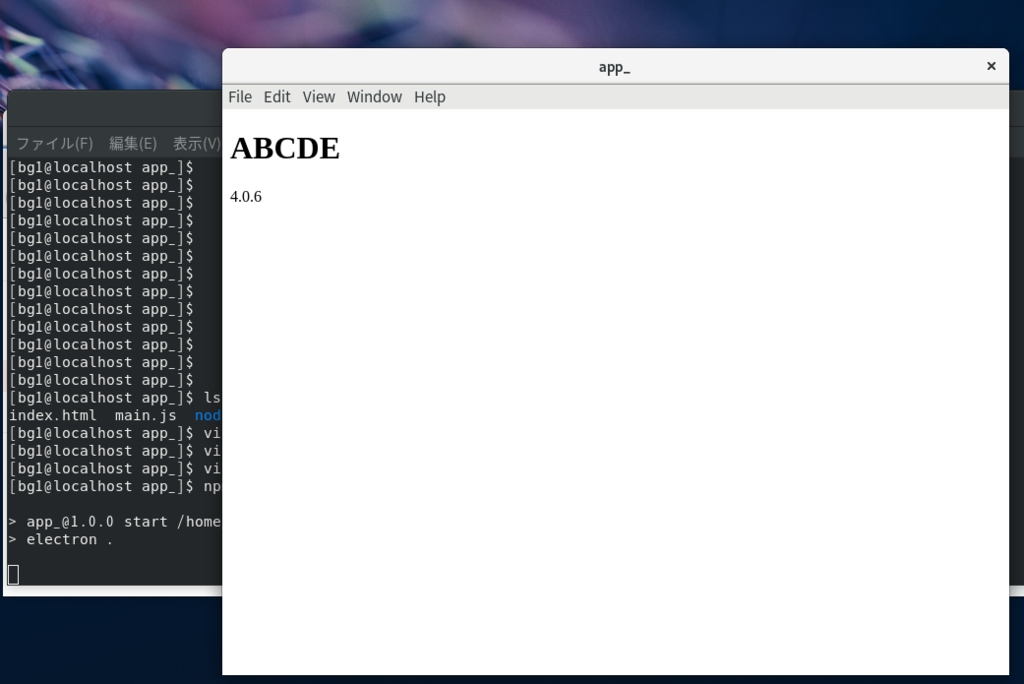
このように表示される。
Sample/electron/app/app/src/app_ at master · bg1bgst333/Sample · GitHub
